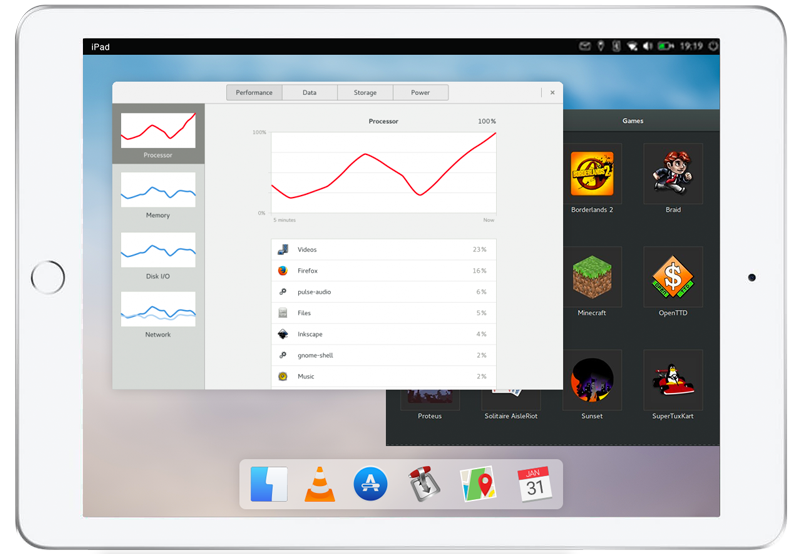
The iPad is too powerful to not get the Linux treatment.
Linux on iPad
iPad Linux tracks community efforts to run Linux on iPads, especially the models Apple no longer supports. Those iPads still work, and with Linux they could keep going as cheap computers or parts for projects.
Releases
Projects that run Linux directly on iPad hardware, not inside an app.
These projects rely on jailbreaks and boot exploits, which can leave an iPad unusable or erase its data. Back up first, and only use a device you can afford to lose.
No projects match these filters.
Omarchy A
by Henrik Klee, OrchardLinux · Updated October 2026
- Installable
- Touch
- Wi-Fi
- Bluetooth
- Tethered boot
- No GPU
Omarchy A
by Henrik Klee, OrchardLinux · Updated October 2026
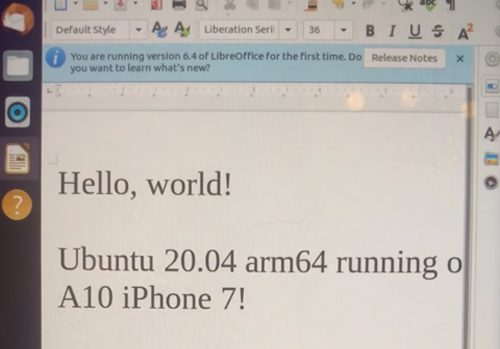
A bootable Arch Linux ARM desktop for the iPad, with Omarchy's look adapted for touch. On the iPad 6 Wi-Fi model it installs onto the tablet's storage, beside iPadOS. Orchard is the hardware support, kernel patches, and the tool that builds, boots, and installs it. iPad 5, iPad 7, iPad Air 2, and iPhone 6 support is in Orchard and still experimental.
- iPad (6th gen, Wi-Fi) · Apple A10
- iPad (5th gen) · Apple A9 · experimental
- iPad (7th gen) · Apple A10 · experimental
- iPad Air 2 · Apple A8X · experimental
- iPhone 6 · Apple A8 · experimental
What you need: for Omarchy A, the iPad 6 Wi-Fi model on iPadOS 16 or later, a Mac or Linux computer, and a USB data cable. Free at least 9 GB that iPadOS is not using, with Resize APFS, then run orchard install omarchy-a from DFU. The other devices are brought up from the Orchard repo.
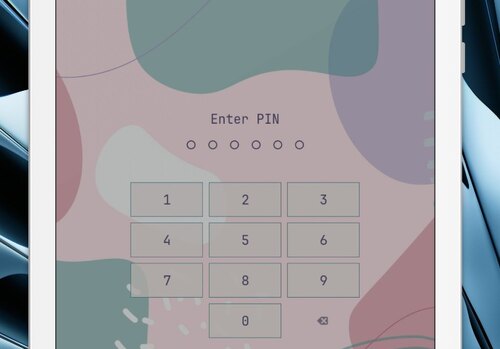
On the iPad 6, Linux lives on its own partition beside iPadOS. A restart still needs a computer: put the iPad in DFU and run orchard launch. The desktop signs in as tablet. You choose a sudo password and a 6-digit lock PIN during install. There is no disk encryption, and the boot exploit gives anyone holding the device full access. Use a spare iPad.
Working
- On the iPad 6 Wi-Fi: Omarchy A, a touch desktop on Arch Linux ARM
- Multitouch, swipes, hardware buttons, and an on-screen keyboard
- Wi-Fi and Bluetooth
- A boot partition and a Linux system on the internal storage, beside iPadOS
- Battery level, backlight, and charging. Apple chargers can supply up to 2.4 A; a computer or many USB-A chargers stay at 500 mA
- One DFU session downloads the release, writes it, and starts the desktop
- On the iPad Air 2 Wi-Fi, experimental, in Orchard: a RAM boot with display, Wi-Fi, battery level, backlight, and buttons
- On the iPhone 6, experimental, in Orchard: a tethered RAM boot to a console, with touch
Shortcomings
- Every cold start needs a computer and DFU mode.
- No GPU acceleration, so the desktop is drawn in software.
- Speakers, the microphone, the cameras, and suspend are missing.
- Omarchy A installs on the iPad 6 Wi-Fi model. iPad 5, iPad 7, and iPad Air 2 are experimental hardware support in Orchard. The iPad Air 2 and the Samsung iPad 5 boot from RAM. The iPad 7 is mostly untested.
- The iPhone 6 boots from RAM. Wi-Fi, Bluetooth, and installing onto its storage are still open.
- iPhone 7 and 7 Plus have device profiles in Orchard, and they have not been tested on hardware.
Built on
Built on checkm8 by axi0mX, palera1n and PongoOS, m1n1 from Asahi Linux, Hoolock Linux, and Project Sandcastle. iPad 7 touch work by Pauli1Go. iPad Air 2 support comes from Martin Puškáč's port, brought over by micro23. iPad 5 support comes from Berkay Kösebay.
Project Cascadia
by rzxvx · Updated October 2026
- Not installable
- GPU desktop
- Touch
- Wi-Fi
- Bluetooth
- Speakers
Project Cascadia
by rzxvx · Updated October 2026
Runs Linux and Alpine on the original iPad mini, with a GPU-drawn touch desktop, Wi-Fi, and Bluetooth. An experimental build also boots Linux to a shell on the iPhone 11.
- iPad mini (1st gen) · Apple A5
- iPhone 11 · Apple A13 · experimental
What you need: for the iPad mini, that Wi-Fi model, a Mac or Linux computer, and either jailbroken iOS or a Raspberry Pi Pico. The iPhone 11 build needs that phone, a computer, and a usbliter8 board.
iOS stays installed. Linux isn't written to the device's storage; its files live on a connected computer, where what you install survives a reboot, or in memory for a single boot. Putting Linux on the iPad itself is still on the roadmap, and that removes iOS.
Working
- On the iPad mini: Linux 6.12 and Alpine Linux 3.24
- Both CPU cores
- Multi-touch, and an XFCE desktop drawn by the GPU, with an on-screen keyboard
- Wi-Fi on 2.4 and 5 GHz, including password-protected networks
- Bluetooth, including a keyboard
- Speakers, the battery level, and charging over the cable
- Volume and brightness buttons, the side switch, and the screen turning with the iPad
- SSH, and installing packages with
apk - Read-only access to iOS system files
- On the iPhone 11, experimental: Linux 7.2 boots to a shell on the screen and over USB, with SSH. Alpine's files live on a connected computer, and all six cores run.
Shortcomings
- It can't boot by itself. The iPad mini starts from jailbroken iOS or a Raspberry Pi Pico, and the iPhone 11 needs a usbliter8 board.
- USB accessories such as flash drives and USB keyboards don't work.
- Your iOS data, such as photos and apps, can't be read.
- The iPhone 11 build has no touch, Wi-Fi, Bluetooth, audio, or desktop.
- No other iPad model boots yet.
Built on
Built on iBSSloader by teutekeune, checkm8 by axi0mX, Legacy iOS Kit and EverPwnage by LukeZGD, checkm8_bootkit by NyanSatan, iBoot32Patcher by iH8sn0w, and the Z2 touch work from Project Sandcastle. The iPhone 11 port is built on Hoolock Linux and m1n1 from Asahi Linux, and boots with usbliter8.
Resources and Tools
Apps that bring Linux to iPadOS today, the tools developers use to port it to the hardware, related projects, and people worth following.
Apps
 iSH
iSH
A Linux shell that runs as an app, from the App Store
 UTM
UTM
Virtual machines on iPadOS. UTM SE is on the App Store; the full app is sideloaded.
 Resize APFS
Resizes APFS storage, via palera1n, to make room for Linux.
Dev tools
 usbliter8
An A12/A13 SecureROM exploit
 Project Sandcastle
Linux and Android on iPhone 7
 checkra1n / PongoOS
A jailbreak for A7–A11 devices, built on checkm8. It must be rerun after every reboot.
 Legacy iOS Kit
Restore, downgrade, and jailbreak older devices. Cascadia uses it to put the iPad into a mode that can load Linux.
EverPwnage
Untethered jailbreak for 32-bit devices on iOS 7.0–9.3.6, including the A5.
 ipwndfu / checkm8
axi0mX’s open-source jailbreak tool, and the checkm8 BootROM exploit it carries.
 iBoot32Patcher
iH8sn0w’s patcher for 32-bit iBoot, from iPhone OS 2 through iOS 10.
 checkm8_bootkit
NyanSatan’s kit for booting a custom bootloader on 32-bit devices.
 Linux Apple Resources
SoMainline’s guide to building and booting a custom Linux kernel on iPhones and iPads
 iBSSloader
teutekeune’s original work booting Linux on the iPad mini 1. Project Cascadia is built on it.
Other projects
 ios-linuxkit
An ARM64 Linux runtime for iOS projects
 postmarketOS
Touch-optimized and pre-configured Alpine Linux
 Wawona
Shows Linux desktops from other machines on iPadOS. Public beta, no jailbreak.
Archive
 QMole
QMole
Who to follow






News
Got a news tip for us?
Working on a port, or found an article we missed? Open a GitHub issue with a link,
the device and chip it covers, and whether the project is still active.
Issue